An invitation gives you a proposed role, but you only get access after you explicitly accept it. Invitations expire after seven days.
On an invitation-only deployment, such as the demo, public signup is unavailable. You can still use a valid invitation to create and verify an invited account, or sign in with an existing account and accept it.
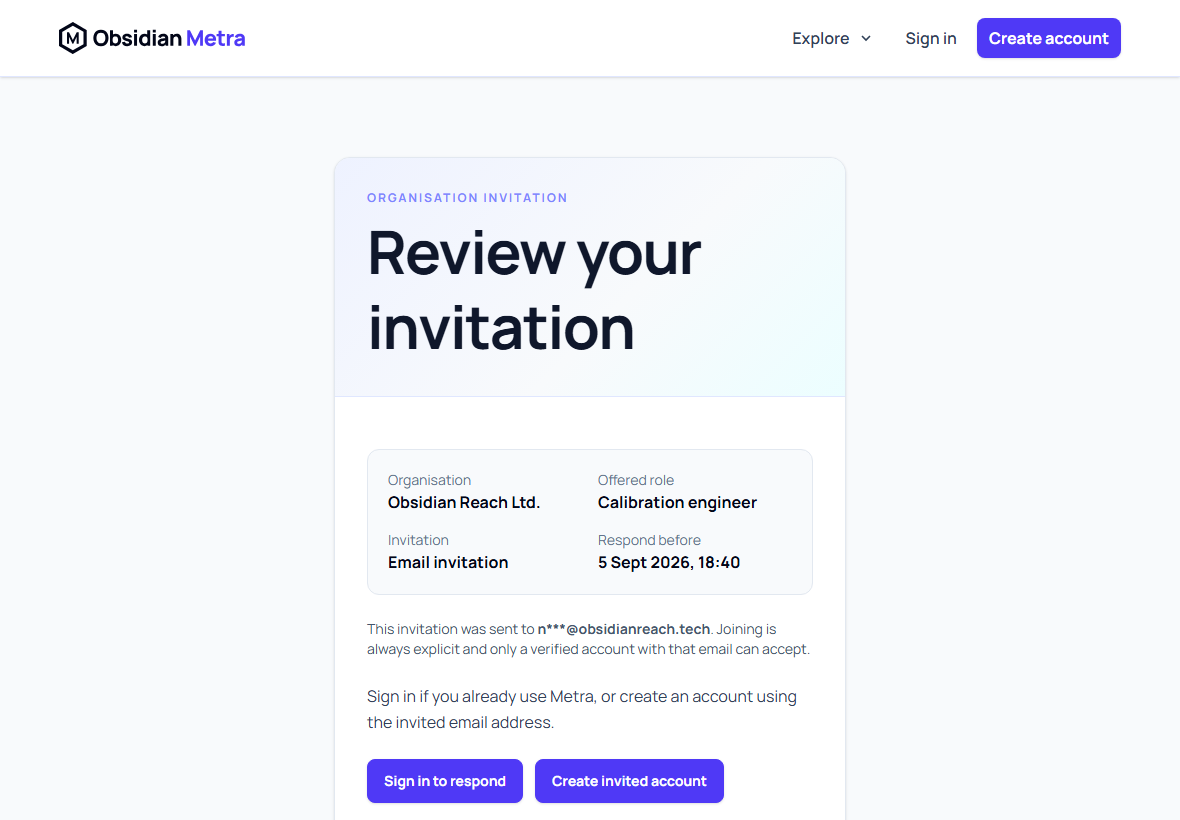
Open the invitation email
Select Review invitation in the email. The public review page shows the organisation, offered role, masked invited email, and expiry. After authentication, the full invitation review can also identify the inviter when that information is available. The invitation secret is removed from the browser address immediately.
If you were not expecting the invitation, you can decline it. If ignored, it does not grant any access.
If you already use Metra
- Select Sign in to respond.
- Sign in with the verified email address to which the invitation was sent.
- Open Organisations and review the pending invitation's organisation and role.
- Select Accept invitation or Decline invitation.
If another account is signed in, Metra will not accept the invitation. Use Switch account and sign in with the matching email address.
If you are new to Metra
- Select Create invited account.
- Enter your name. The invited email is fixed and cannot be changed.
- Open the account-verification email.
- Follow the verification link, choose a password, and continue to Organisations.
- Review the pending invitation and explicitly accept or decline it.
Verifying an account does not automatically join the organisation.
Recover an invitation
After signing in, open Organisations in the top navigation. The Pending invitations section lists invitations linked to your verified email, even if the original browser tab was closed. The same page lists every organisation you have already joined.
For an expired, cancelled, superseded, or unavailable link, ask an organisation owner or administrator to issue a fresh invitation. If verification email has not arrived, use Resend verification email and check your junk folder.
After accepting, you go directly to the organisation's Setup page for guidance matched to your role, including when you accept from an invitation link. If the organisation details cannot be loaded, acceptance is not submitted; keep the invitation page open and retry. The Setup navigation link lets you return after completing or deferring tasks, or dismissing the guidance. See Complete your organisation setup. Setup is optional and never blocks access to the dashboard.
Recovering from a failed action
If accepting or declining fails, the invitation details and controls remain visible. Read the error, retry the action or choose Refresh invitation to check its latest status. If initial loading fails, use Retry loading invitation.