This guide follows one equipment requirement's calibration event. For several devices using the same approved group-enabled method, choose Start group calibration from Calibration work or a work order and follow Calibrate a group of devices. The group creates a separate event for every selected requirement; return to these individual task pages for evidence that remains device-specific.
Failed results and limitations
Selecting Failed or Indeterminate immediately shows that the result is unacceptable for use. Passed with limitations requires review of the stated limitations and applicable requirements; a failed as-found measurement still requires an investigation even if as-left work passes. Evidence can be complete enough to submit without being acceptable for use. Submission readiness describes evidence completeness, not operational release.
Saving or submitting unacceptable evidence records quality alerts according to notification settings. Draft selection alone does not apply a hold. Use Stop use / quarantine equipment when an authorised quality member must contain equipment immediately; record the reason on the equipment confirmation dialog. Members without that authority should hand the containment decision to quality.
Before approval, review the displayed consequences: approval retains unacceptable evidence, quarantines equipment and opens its investigation with audit and notification records. It does not advance the due date. Approval of acceptable evidence does not clear an existing hold; release is a separate authorised decision. The review workspace confirms the outcome after success.
The selected requirement determines the evidence route. Provider work retains its reviewed provider or external method reference, result and required external certificate, without internal procedure execution or an internal calculation budget merely for recording provider evidence. Verification or functional-check requirements may use defined acceptance criteria and results with no certificate. Internal work retains the controlled method and applicable traceability, uncertainty, conformity and personnel authorisation evidence. Non-accredited work may still need technically necessary uncertainty.
The work record freezes its evidence policy and applicable versions when started. Changing setup answers later cannot remove those controls or rewrite completed evidence. Metra-issued certificates are prepared after work approval; their route does not require an uploaded provider certificate to submit the work. Accredited claims are checked for the specific work item and approved scope.
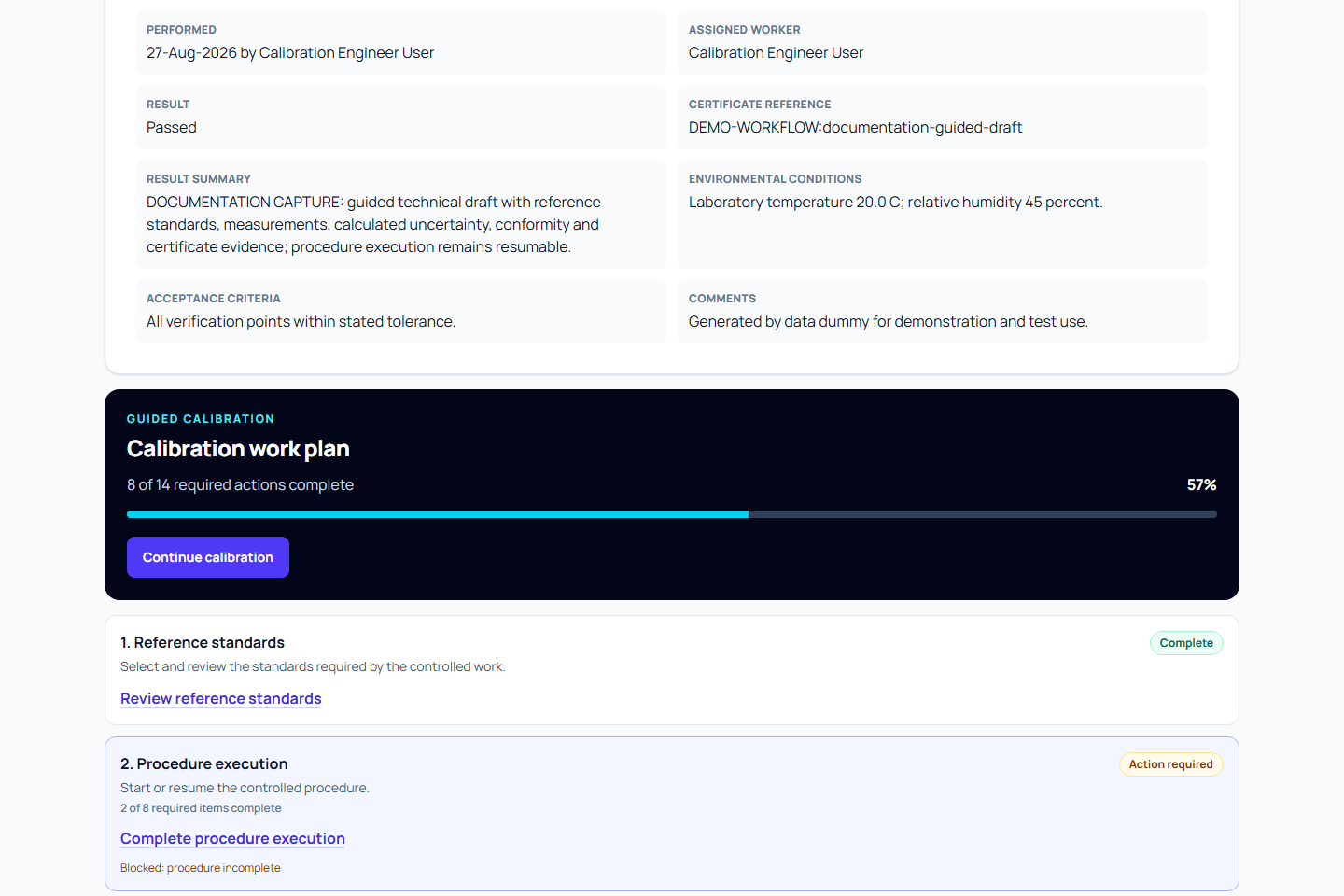
A calibration event records one piece of work completed for one requirement. The event overview is a read-only hub: use it to understand progress and jump to the focused page for each evidence task.
Check whether you can start the draft
Choose the equipment and requirement before completing the draft details. Metra checks your current recording permission, requirement controls and applicable technical authorisation. Any blocker appears above the form with a route back to the requirement. Changing the performed date, performer or actual work site refreshes these checks. If the check cannot load, retry it; an unavailable check is not permission to record work. The service checks these controls again when the draft is created.
During independent review, approval blockers include the applicable evidence, technical-authorisation and signature requirements. Passing independence checks alone does not grant approval permission. Follow the stated correction or ask the eligible member to resolve it; do not change the performer or remove a controlled requirement to bypass the refusal.
Record certificate identity and setup
Choose internal or customer work. For customer work, choose a client and its site; do not substitute the customer address for the place of calibration. Drafts started from work orders inherit their recipient information. Review or complete these details in Result summary.
Review Actual place of work and Work site, which describe the laboratory or on-site operational context. For Metra-issued certificates or internal reports, also select the registered Calibration location and confirm its effective address; choosing a work site alone does not complete output readiness. Add relevant environmental, transport and stabilisation evidence when creating the draft, or complete it in Result summary before Start guided execution. Creating a draft does not start the controlled procedure; guided execution checks required evidence and freezes this context. See Prepare and perform on-site work and Plan internal work and reports.
Use Certificate setup notes for approved information that should appear on the certificate, such as actual apparatus, immersion depth and measurement scale. Internal comments are separate and are not automatically published. Organisation contacts, effective location address and the controlled method description must be complete before new certificate issuance.
Before you start
- Use an active or suspended requirement for the equipment. A draft requirement must be activated first.
- Confirm the performer and performed date.
- Check the frozen procedure, measurement, reference-standard, uncertainty, conformity, and certificate controls.
- Have permission to work on the assigned event.
Calculated uncertainty always requires structured measurement evidence. Externally reported uncertainty can instead come from supplied documentary evidence.
For provider work, link a reviewed provider or retain the stated external method reference, upload the certificate and record its reported or documentary uncertainty. An unstated k remains unknown. Permitted non-accredited internal calibration and quantitative verification can instead use an independently approved declared-U revision with a controlled method and structured measurements. The declared route cannot replace accredited calculations.
If no equipment exists, the creation page directs you to register it, assign its site and prepare a requirement. If requirements fail to load, use Retry requirements; entered draft details stay on the form. Customer work needs an active client and its site. Complete missing customer setup in another tab and use Refresh customer options when you return.
The planned evidence path follows the requirement's certificate route. External certificates need an upload. Metra-generated certificates need complete certificate identity, organisation contacts, numbering and technical evidence; they do not require a provider certificate upload.
Create the draft
- Open Calibration work or the equipment requirement.
- Select Record calibration work.
- Confirm the requirement, performed date, performer, and known summary details.
- Review the inherited work controls and planned evidence path.
- Select Create draft and continue.
The created draft opens at its calibration hub. No evidence is edited on this page.
Controlled internal work captures the performer's method authorisation when the draft starts. If you change the performer or performed date in a draft, Metra checks and captures eligible authorisation for that draft's frozen method. An ineligible change leaves the saved draft intact. Later requirement changes do not replace the method of work already started.
Follow the work plan
Metra determines readiness, blockers, progress, and the recommended next action. Use Continue calibration for the safest next task, or open an available task directly.
The work plan shows this sequence:
- Select eligible reference standards when required.
- Start or resume the controlled procedure.
- Record structured measurements.
- Calculate or record measurement uncertainty.
- Calculate conformity decisions.
- Complete the result and technical summary.
- Upload external certificate evidence or resolve generated-certificate readiness, according to the frozen route.
- Review readiness and submit.
This order is your map, but Continue calibration can jump if prerequisites or saved progress require a different step first. A focused task can remain blocked until prerequisites are complete.
Save long-running work
Each completed step is saved immediately as fixed execution evidence. If you leave, sign out, or return later, Metra resumes at the first unresolved required step.
For a group participant, the individual procedure page identifies shared operations and the exact shared evidence linked to that device. Record shared operations in the group workspace and complete each device's remaining steps independently. The session fixes the performed calendar date, procedure revision and actual site; individual summary edits cannot change that shared context. Other recipient, output and technical-summary requirements still need review on each event.
Submit for review
Open Submission review from the work plan. Resolve every blocker, review warnings, and select Submit for approval when the Metra allows it.
Submitting freezes the event details and the exact procedure execution, measurement revision, standard usage, traceability assessment, uncertainty evaluation, conformity evidence, acknowledgements, and certificate version used.
The performer or submitter cannot approve their own event. A different authorised quality user must approve or reject it.
In a group session, Submit selected devices offers an explicit selection and per-device outcomes. It uses each event's normal readiness and signature checks. Resolve an incomplete device without repeating successful submissions for the others, and use Reconcile previous submission after an interrupted group request. Review and approval remain individual; see Review procedure execution evidence.
A replacement of an approved event starts a new draft using the current requirement's evidence controls. The approved original and its evidence remain retained. Complete the replacement's required evidence before submitting it.
Related guides
- Execute a calibration procedure
- Calibrate a group of devices
- Select reference standards
- Record measurement results
- Calculate measurement uncertainty
- Calculate conformity decisions
- Upload a calibration certificate
- Generate a calibration certificate
Protect an unfinished calibration form
The creation form warns before leaving or closing the tab with unsaved changes. Create the draft to retain it on the server and continue working. A navigation warning does not itself save or submit the event.
Finish the evidence workflow
Approved, superseded and cancelled events retain their evidence and work-plan history without offering Continue next required task. A retained earlier readiness recommendation does not reopen completed work. Use the normal correction or supersession process when an approved record needs amendment.
Review an ownership-based recipient suggestion
A new calibration draft may suggest a work recipient from the server's current permanent-ownership checks when recipient fields are blank. Review the visible explanation, customer site or internal department for the actual job. Existing entered choices and issued recipient snapshots are preserved. Legacy unknown ownership does not imply a client from the equipment's current site.